Why Your Mix Sounds Muddy (and How to Fix It)

A muddy mix sounds blurred and congested in the low mids, and if all you have left is a bounced stereo file, a free browser equalizer can pull some of that energy back out. But reaching for EQ first is why most people never actually fix it. Mud is a symptom. It has at least six different causes, only one of which is solved by moving a fader on an audio equalizer, and the cut that helps one cause makes another one worse.
So this guide runs the other direction: what mud is at the level of your ear and the arithmetic, then how to tell which cause you have, then what to do about it, in that order.
Where mud actually lives, and why the sources disagree
Look up the frequency range of mud and you get four different answers. eMastered says 200–500 Hz. Mastering.com puts it at 200–400 Hz, sometimes drifting either side. Sage Audio says 150–450 Hz. iZotope frames it as frequency build-up below roughly 400 Hz.
That spread is not sloppiness. The low bound moves between 150 and 200 Hz depending on whether the writer counts boominess as mud, and the high bound moves between 400 and 500 Hz depending on whether they count boxiness. The band all four overlap on is 200–400 Hz, and the middle of that, around 250–350 Hz, is the most reliable place to start listening.
Treat that as where to start listening, not as the answer. A dense guitar arrangement muds up around 300 Hz; an over-layered synth bass can do it at 180 Hz; a small untreated room can hand you something that measures at 120 Hz and reads as mud anyway. If you want the wider map of what lives where, our guide to audio frequency ranges covers the whole spectrum.
Mud, boom, box, honk, harsh: name it before you cut it
A lot of bad EQ decisions come from applying the mud fix to a problem that isn't mud. These five get confused constantly and they have different cures.
| What you hear | Rough range | Sounds like | Usually a problem with |
|---|---|---|---|
| Boominess | 80–250 Hz | Loud, long, undefined low end | Decay and the room as much as level |
| Mud | 200–500 Hz (agreed 200–400, core 250–350) | Blurred, no separation between parts | Cumulative buildup across many sources |
| Boxiness | 300–600 Hz | Cardboard box, hollow | Colouration on a single source |
| Honk | 450 Hz–1 kHz | Speaking through a tube (nasal sits higher still) | One source, usually a mic or room resonance |
| Harshness | 2–5 kHz (often 3–4 kHz) | Brittle, fatiguing, spiky | Frequently self-inflicted (see below) |
The distinction that matters most: boxiness is a colouration on one track, mud is a relationship between tracks. That is why you can solo a boxy guitar, find the offending frequency and fix it, and why doing the same thing to a muddy mix track by track usually leaves you with a thin mix that is still muddy.
Harshness deserves its own warning, because it is often something you did to yourself. You cut the low mids too hard, the mix loses body, you compensate by boosting the highs, and now you have traded mud for a scooped, fatiguing mix. Mud and harshness are frequently the same mistake at two different stages.
Why the low mids do the damage: upward spread of masking
This is the mechanism that explains why mud is so much more destructive than a problem of the same size anywhere else in the spectrum.
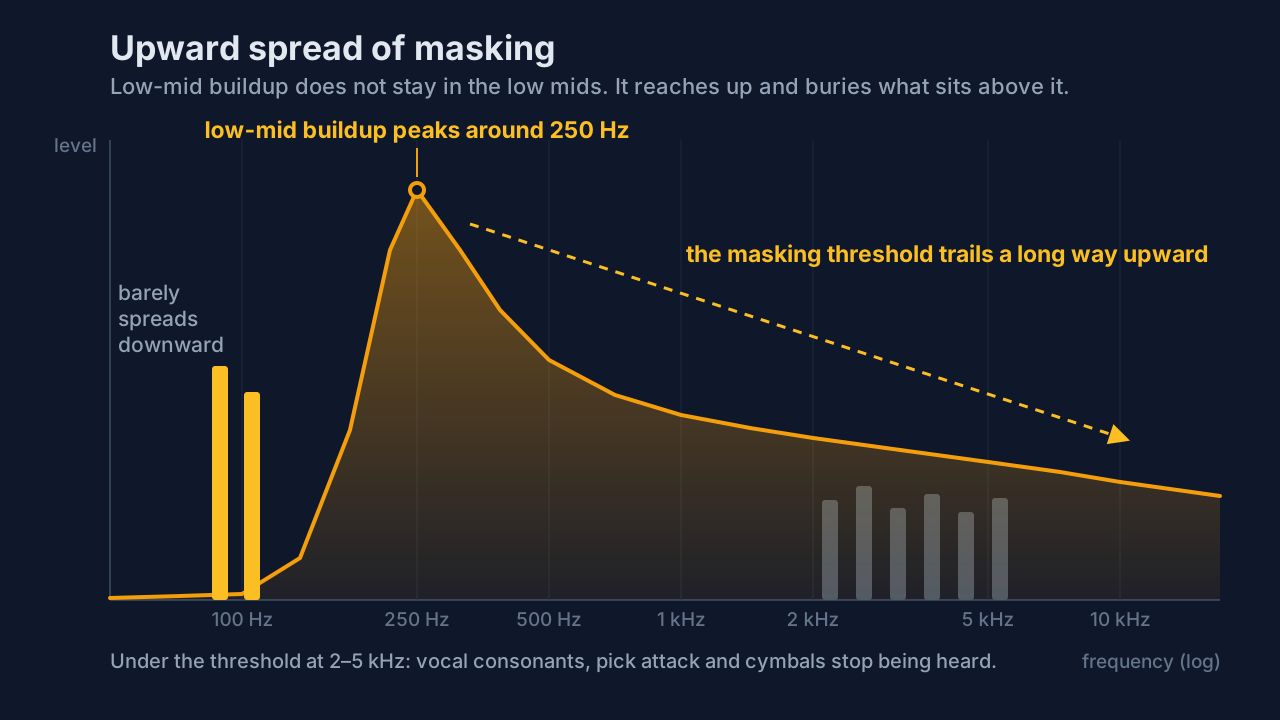
Masking is when a louder sound raises the threshold at which you can hear a quieter one in a nearby frequency region. What matters is that masking is asymmetric. A low-frequency masker suppresses higher-frequency content far more effectively than a high-frequency sound suppresses lower content. The physical reason is the shape of the excitation pattern on the basilar membrane in your inner ear: it has a long tail that extends upward, toward higher frequencies. Low energy smears up the spectrum. High energy barely smears down.
Two consequences follow from that asymmetry.
First, a buildup at 250 Hz does not just muddy 250 Hz. It reaches up and eats into the definition of everything sitting above it, most strongly in the octave or so directly above, but far enough to touch the consonants in a vocal, the pick attack on a guitar, the stick on a snare. You hear the result as "the vocal isn't cutting through" and go boost 3 kHz on the vocal, which is treating the symptom two octaves away from the cause.
Second, and this is the counterintuitive one: the masking effect gets stronger as level rises. Turning a muddy mix up doesn't buy you the detail you're hoping for; the louder the low mids get, the further up the spectrum they reach.
Why it accumulates: the summing arithmetic
The second mechanism is arithmetic, and it explains why mud arrives without anyone doing anything obviously wrong.
When you sum two identical, in-phase signals, they add +6 dB on each doubling. When you sum two genuinely uncorrelated signals, powers add and you get +3 dB on each doubling, as a statistical average over time. Real musical tracks sit between those two: independently performed, so not correlated, but harmonically and rhythmically related, so not independent either. Partially correlated. So accumulation usually lands somewhere between +3 and +6 dB per doubling, which makes +3 dB a working estimate rather than a ceiling. Where parts are genuinely out of phase with each other you can get less than +3 dB, or cancellation, which is a different problem covered further down.
Now run it. Four tracks with healthy low-mid content go to eight, eight go to sixteen: a rhythm guitar double, a piano, a pad, room mics, backing vocals. You have added something on the order of 6–12 dB of energy in exactly the band that masks everything above it, and nobody touched a fader wrongly. The absolute number matters less than the balance: you pull the master fader back, but the low mids have grown relative to everything else, and that ratio is what you hear as mud. Every individual track is fine. The sum is mud.
This is also why mud tends to appear at the same moment in an arrangement, at the biggest chorus, where the track count peaks.
Diagnose a muddy mix before you cut
Work down this list in order. Each step has a check that tells you whether it's your problem, and the earlier ones are both more common and more expensive to fix later.
1. Arrangement. Mute things. If muting one of two rhythm guitars, or the pad, or the left-hand piano part makes the mix snap into focus, no EQ move was ever going to be as good as that mute. Two instruments occupying the same octave with the same rhythm is an arrangement problem wearing an EQ problem's clothes.
2. The source recording. Directional (pressure-gradient) microphones exhibit proximity effect: the closer the source, the more the low end lifts, with the rise typically starting around 300 Hz and below. On some designs, very close in, the boost runs to 10 dB or more, though it is highly mic- and distance-dependent. If a vocal or a close-miked cab arrived already thick, that's why. True omnidirectional (pressure) mics don't do this at all.
3. The room and your monitoring level. Room modes concentrate bass in corners and near boundaries. Speaker boundary interference, where direct sound arrives alongside a reflection off a nearby wall or desk, combs the bass into reinforcements and cancellations, and the cancellations are the ones that hurt, because a deep dip is far harder to notice as a problem than a peak. So a room that hides 120 Hz from you makes you push 120 Hz up, and the mud is real everywhere except the room you mixed in. Separately, equal-loudness contours mean your perceived tonal balance shifts with playback level. Mix quietly and you will add low end that turns to mud at normal volume. Check on headphones, a phone speaker, and a car before you trust any low-end decision.
4. Phase and mono. Phones, single-driver Bluetooth speakers and many PA systems sum left and right to mono, and anything out of phase between the channels partially cancels when they do. A low end that sounds huge in stereo can thin out or vanish. Phase cancellation and the mono versus stereo tradeoff are worth understanding properly, because this one is invisible until it isn't. There's a mechanical version too: on vinyl, out-of-phase low frequencies drive the cutter head vertically and can cut straight through the groove wall, which is why cutting engineers keep the low end mono, commonly below about 150 Hz. That figure is long-standing engineering practice, not a published standard.
5. Reverb and delay. Two failure modes: a decay long enough that the tail of one phrase overlaps the start of the next, and low-mid content sitting in the tail itself. Common practice is to high-pass reverb and delay returns considerably higher than you'd ever high-pass a source, with 250–400 Hz repeated a lot, and to set vocal pre-delay around 30–50 ms so the transient lands before the tail arrives. Both are widely repeated starting points rather than rules.
6. Gain staging. If everything is hitting the mix bus hot and any bus compressor is working constantly, you get level-dependent thickening on top of the buildup. Gain staging is the boring fix, and it makes everything after it easier.
7. Only now, EQ. If the arrangement is clear, the sources are clean, the room isn't lying, phase checks out and the reverbs are disciplined and it's still thick, now you have a genuine EQ problem, and now a cut will actually hold.
Fixing it in the right order
Arrangement first: mute, then re-voice. Move a part up an octave, change a chord voicing, thin a double. This costs nothing and fixes more mud than any plugin.
Sources second. Re-record if you can and the proximity effect was the cause; a few inches of distance beats a 6 dB cut. Otherwise treat the offending source individually.
Per-source EQ third, and surgically. Find the specific source contributing most in 250–350 Hz, which is usually not the one you'd guess, and cut there. If you're new to this, our explainer on what EQ actually does covers shelves, bells and Q. Two or three targeted cuts on the worst offenders will beat twenty small ones everywhere.
Then check mono, then discipline the reverb returns, then look at dynamics. A compressor doesn't remove mud, but uncontrolled low-mid dynamics make a mix read as inconsistent and thick in the loud sections specifically, and how to use a compressor covers where it does and doesn't help.
The mix bus comes last, and does the least.
What you can fix on a finished stereo mix, in the browser
If the multitrack is gone and you have one stereo file, you're doing damage control, and that's a legitimate thing to do as long as you know that's what it is.
The Vocal Cut equalizer is a six-band graphic EQ that runs entirely in your browser: a low shelf at 80 Hz, peaking bands at 240 Hz, 750 Hz, 2.2 kHz and 6 kHz, and a high shelf at 12 kHz. Each band gives you ±12 dB in 1 dB steps. Your audio never leaves your device, the processing happens locally, stereo is preserved with each channel filtered independently, and the file's duration is unchanged.
For mud specifically:
- 240 Hz is your direct handle. Start at −1 to −2 dB and listen to whether the vocal steps forward. Small moves win; a −6 dB gouge here will hollow the mix out.
- 2.2 kHz is where you check your work. If the mix now sounds harsh, you overcut the low mids and are compensating with brightness. Back the 240 Hz cut off rather than cutting 2.2 kHz.
- Preview live while you drag, then export. WAV export is lossless; MP3 and Opus re-encode.
Two honest limits. First, on a bounced mix you are moving the kick, bass, guitars and vocal together, so a 240 Hz cut that helps the vocal also thins the kick and bass, and there is a ceiling on how much good it can do. Second, this is a graphic EQ with fixed bands. A parametric audio equalizer lets you sweep the centre frequency and narrow the Q to hunt down one specific resonance; this one gives you six fixed points at a moderate bandwidth. For broad tonal correction that's the right tool. For surgery on a 312 Hz resonance, it isn't. There are no best audio equalizer settings for mud, because the frequency and the amount depend entirely on which of the six causes above you actually have.
There's also a diagnostic move here that a plain EQ can't give you. Run the mix, or a commercial reference track in the same genre, through the stem splitter and listen to the separated parts. AI separation runs on your own device and takes real processing time (the first run downloads the model), and the stems won't be perfect, but they're usually good enough to answer the question you care about: which element is actually carrying the low-mid energy? Comparing your stems against a reference's is the fastest way to hear that your pad is doing what a reference's bass is doing. Splitting a song into stems walks through the process.
If the file is genuinely finished and you're doing final loudness and tone, the online mastering tool is the later stage, but master a mix you've fixed, not a muddy one you're hoping mastering will rescue.
Advice worth ignoring
"Cut 250 Hz by 3 dB and you're done." A prescription without a diagnosis. If the cause was the arrangement, the source, or your room, this leaves you with a mix that's thin and still muddy.
"High-pass every channel." Every minimum-phase high-pass rotates phase around its cutoff, and thirty of them at thirty different cutoffs rotate thirty different amounts, so shared low-end content between tracks stops summing cleanly. Indiscriminate high-passing also strips the body that makes a mix sound full. High-pass what genuinely has nothing down there.
"Solo the track and EQ it until it's clean." Mud is relational: it exists between sources. A track that sounds thin in solo is often exactly right in context, and the one that sounds gorgeous soloed is usually the one eating your mix. EQ in context.
The smiley-face trap. Reduced low mids feel pleasing for a moment, so people overshoot the cut, then add lows and highs to compensate. You've traded mud for a scooped, harsh mix.
"Turn it up so you can hear the mud." Backwards. Masking strengthens with level. Quiet playback and a mono check will reveal mud far better than loud stereo will, though don't decide how much low end the mix needs at that level.
"Trust the analyzer." A spectrum analyzer shows energy, not masking. A 250 Hz region that looks perfectly flat can still be burying your vocal, because the analyzer doesn't model your cochlea.
"Fix it on the master bus." A broadband low-mid cut across the whole mix also removes the low mids the kick and bass need to sound like anything. Per-source is nearly always the right layer to work at. Mixing and mastering are different jobs, and this is one of them.
If you're building the whole chain from scratch, the beginner's raw-recording-to-finished-edit workflow puts these stages in order, and there are more practical guides on the how-to hub.
Frequently asked questions
What frequency is mud in a mix?
Published guides put it anywhere between 150 and 500 Hz; the band they all agree on is 200–400 Hz, with the core of the problem usually around 250–350 Hz. The edges vary because they blur into boominess below and boxiness above. Use 250–350 Hz as a place to start listening, not as a number to cut blindly.
How do I know if my mix is muddy?
Listen quietly, in mono, on a small speaker. If the vocal stops cutting through, individual instruments lose their separation, and turning the volume up makes things worse rather than clearer, that's mud. A useful test is muting one dense element: if the whole mix suddenly focuses, you had a low-mid buildup rather than a tonal problem on any one track.
What is the difference between muddy and boomy?
Boominess sits lower, around 80–250 Hz, and is heard as a loud, long, undefined low end, often as much a decay and room problem as a level problem. Mud sits higher, around 200–500 Hz, and is heard as a loss of separation between parts. Boominess usually comes from one source or the room; mud is cumulative across many sources.
Should I high-pass every track?
No. Every minimum-phase high-pass rotates phase around its cutoff, and thirty of them at thirty different cutoffs rotate by thirty different amounts, so shared low-end content between tracks stops summing cleanly. It also removes the body that makes a mix sound full. High-pass tracks that genuinely have nothing useful below the cutoff, and treat the rest with targeted cuts instead.
Why does my mix sound muddy in the car but fine on headphones?
Different playback systems expose different problems. A car's cabin has its own strong low-frequency resonances, and your room may have been hiding a buildup that the car amplifies. If it's the reverse, thin in the car and huge on headphones, suspect phase: many systems sum to mono, and out-of-phase low content partially cancels when they do.
Why does it get muddier when I turn it up?
Because masking strengthens as level rises, and it spreads upward far more than downward. Louder low-mid content suppresses more of the higher-frequency detail sitting above it, so the definition you're trying to hear gets buried further. This is why quiet listening is a better mud check than loud listening, and why a mix that only works loud usually isn't finished.
Can mastering fix a muddy mix?
Only partly. Mastering works on the finished stereo file, so any low-mid cut applies to the kick, bass, guitars and vocal at once. It can improve broad tonal balance, but it can't separate elements that are masking each other. A gentle cut around 240–300 Hz is legitimate damage control. Fixing the multitrack is the real solution.
Is reverb making my mix muddy?
Often, yes, in two ways: a decay long enough that one phrase's tail overlaps the next, and low-mid content sitting inside the tail itself. Mute all reverb and delay returns and listen — if the mix clears dramatically, that's your cause. Common practice is to high-pass the returns around 250–400 Hz and add 30–50 ms of pre-delay on vocals.