How to Remove Silence from Audio
Long pauses, dead air at the start, gaps between sentences — silence is the most common thing standing between a raw recording and a tight, finished one. Removing it by hand is tedious; doing it automatically takes seconds once you understand the two settings that actually control the result.
The quick version
- Open the silence remover and drop in your file.
- Set the threshold (how quiet counts as "silence") and the minimum gap length (how long a quiet stretch must be before it's cut).
- Preview the detected regions on the waveform, adjust if needed, and export.
Everything runs locally in your browser — the file isn't uploaded.
The two settings that matter
Automatic silence removal lives or dies on two numbers:
- Threshold — the volume level below which audio is treated as silence, in dBFS. Because the scale is negative, raising the threshold (say −45 dB → −30 dB) sweeps more audio into the "silence" bucket, which is the aggressive direction: it starts eating the quiet tails of words and soft passages. Lowering it (−45 dB → −55 dB) is gentler, and real gaps start slipping through. Recordings with background noise need a higher threshold than a clean, quiet source, because the "silence" isn't actually silent — it's low-level hiss.
- Minimum gap length — how long a quiet stretch has to be before it counts. This is what stops the tool from chopping the natural micro-pauses between words. A longer minimum keeps speech sounding human; a shorter one tightens more aggressively.
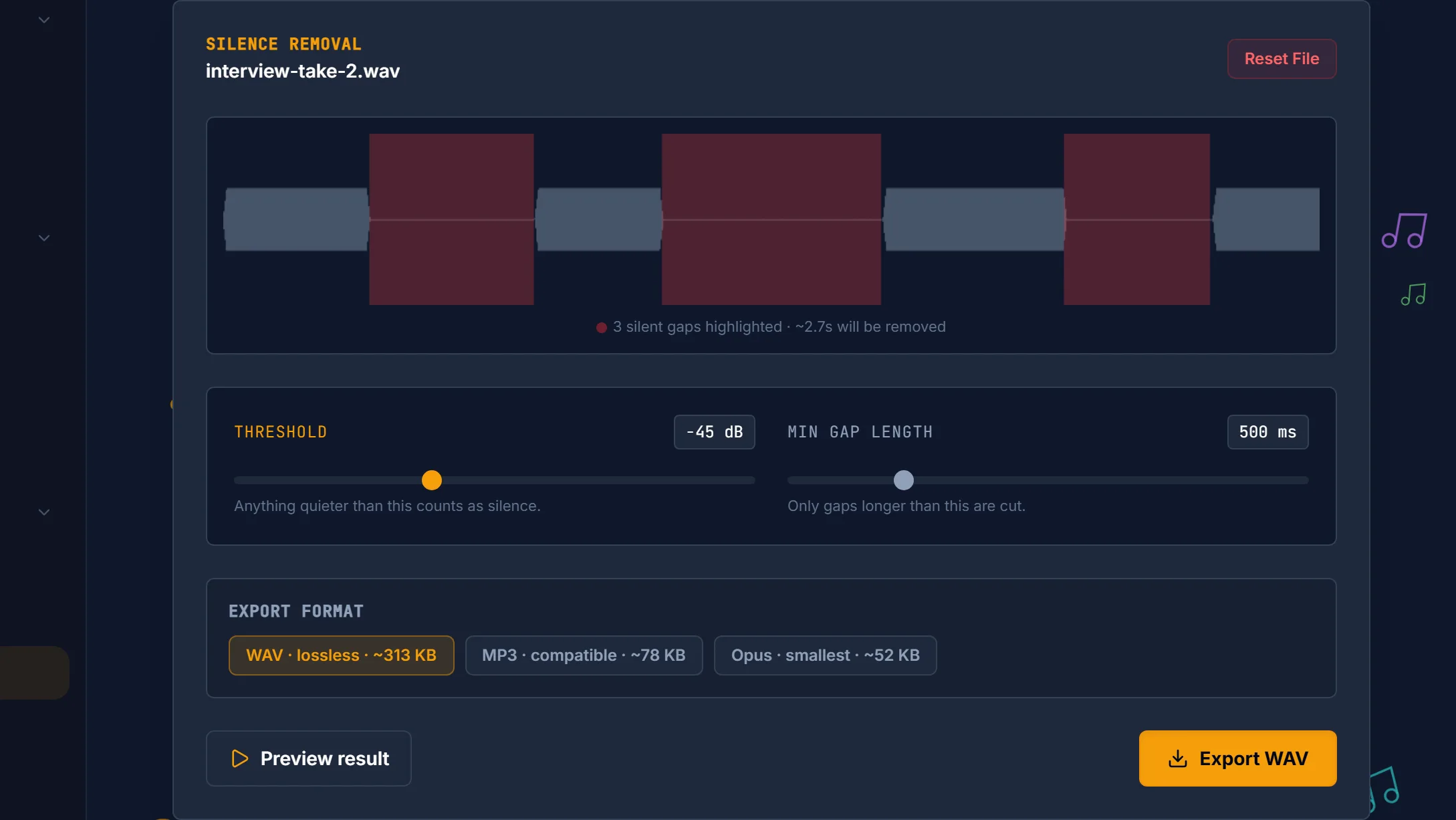
That's the whole job on one screen: the red blocks are the gaps it found at the current settings, and the two sliders underneath are the only things that change which blocks appear.
Where to start
The silence remover opens at −45 dB and 500 ms, which is a sensible default for clean speech. From there:
| Material | Threshold | Minimum gap |
|---|---|---|
| Clean voice, quiet room | −45 dB (default) | 500 ms |
| Noisy room, audible hiss | −35 to −30 dB | 500 ms |
| Music, or anything with soft passages | −55 to −50 dB | 1,000 ms+ |
Treat these as a starting point, not a setting to trust blindly — the right combination depends entirely on the material, which is why previewing the detected regions before you commit matters. Nudge the threshold until the highlighted regions match the gaps you'd have cut by hand.
Don't cut to absolute silence
A subtle but important point: removing a gap entirely and butting two segments together can sound more abrupt than the pause did. Leaving a short sliver of natural room tone usually sounds more natural than a hard, instant cut.
Our silence remover does this for you rather than making it a setting — it keeps a 40 ms pad at each edge of a detected gap, so cuts land in the room tone instead of hard against the waveform. That's why a stripped file still breathes slightly at the joins. It's the same principle behind cutting audio without clicks: the goal is an edit the listener never notices.

Where it fits in a workflow
Silence removal is usually a cleanup step after capture and before final export:
- Podcasts and narration — strip the long thinking-pauses and dead air between takes to keep energy up.
- Voice memos and interviews — cut the gaps where nobody's talking.
- Right after recording — pair it with a quick trim of the ends. If you just captured the audio, start from recording cleanly in your browser; for one-off precise cuts rather than bulk gap removal, an audio cutter is the better tool.
Frequently asked questions
How does automatic silence removal know what's silence? It compares the audio level against a threshold you set — anything quieter than that, for longer than a minimum duration, is treated as a gap and removed.
Why is it cutting off the ends of my words? The threshold is too aggressive, or the minimum gap length is too short. Lower the threshold — from −45 dB toward −55 dB — so those quiet word-tails stop counting as silence, and lengthen the minimum gap so natural pauses survive. Lowering is the gentle direction: less audio falls below the line.
Will removing silence change the pitch or speed? No — it removes whole segments of quiet; the remaining audio plays back exactly as recorded.
Can it handle a noisy recording? Yes, but set a higher threshold so the background noise floor isn't mistaken for content — or run an AI noise reducer first for cleaner detection.